Thursday, 5 November 2015

[amdavadis4ever] Prevent Your Smartphone From Going Up In Flames


How to Prevent a Smartphone Explosion

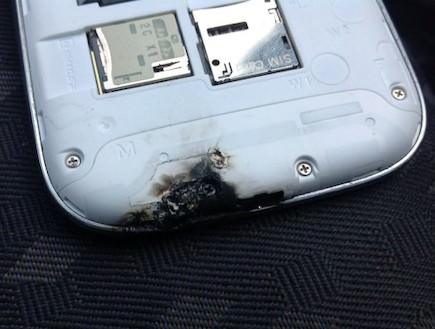
In the past couple of years there have been increased reports of popular smartphones catching fire and exploding – this has stirred up some panic around the world (despite these malfunctions being pretty rare).

Why do smartphones catch fire?

Electronic devices in general and computers and smartphones in particular, require large amounts of power, which also makes them produce a lot of heat. This cannot be negated, but at a certain point, too much heat can damage the device or worse – you!

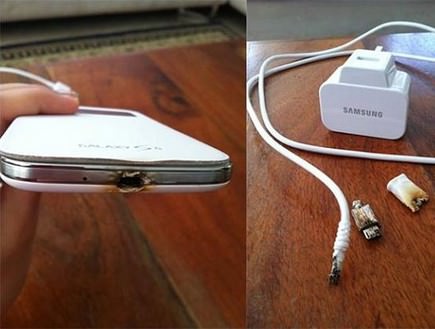
In each electronic device there are tiny, sensitive components. When it comes to your laptop and smartphone, the components are even smaller, making them even more sensitive to heat. Abnormal temperatures can melt the plastic insulation and even some of the more delicate metals, like tin. When this occurs, the devices malfunction, sometimes dangerously so.

9 Reasons your smartphone may catch fire

1. Using your device while charging it

Experts and manufacturers both highly recommend not to use your device when it's being charged. Charging produces a lot of heat, and combined with the heat produced from usage it might be too much.

2. Not using an original charger

Manufacturers instruct users to only use original chargers. The reason is not that they want to sell you more accessories, but that they cannot guarantee the standard in which the other chargers were made, which might make them incompatible and unsafe for use with your device. Many companies do purchase the original components from the manufacturers. If you're using an Apple product, look for the label saying "Made for iPhone/iPad", meaning it has original and licensed components. Professionals warn that the most sensitive device when it comes to non-original chargers is the iPhone 5.


"Made for iPhone" label

3. Non-original car chargers

When it comes to original chargers – a car charger is even more sensitive. The constant movement can cause irregularities in the electrical current and even short out your device.

4. Using a tablet charger on a smartphone
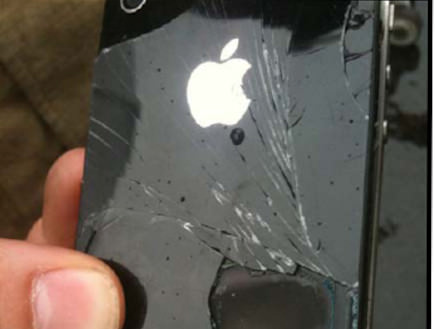
This is even more important when it comes to Apple devices. iPads use a 2.1A current while iPhones use only 1A current. Apple claims it's not very likely to damage your iPhone, but they confirm that your iPhone will experience higher temperatures, which can lead to unwanted side effects.

5. Prolonged charging

Expert tests show that prolonged charging of your device will reduce the efficiency of the battery. If your battery is at 80%, don't charge it, and instead let it drain. It's actually a good thing to let the battery drain all the way to 0% once in a while. It helps prolong its lifespan and efficiency.

6. Using non-original batteries

Most android devices allow you to take the battery out and replace it. When buying a new or spare battery for your phone, insist on an original battery. Non-originals can be of lesser quality, meaning won't last as long and might even ignite or worse.

7. Old batteries

It's important to change your phone's old battery once in a while. If your battery runs out in one day, then it's time to replace it. As a rule, it would be wise to replace it once a year.

8. Physically-damaged batteries

Any physical damage or deformity (like swelling) may lead to the battery leaking and possibly igniting or even exploding when it comes to contact with an electrical source (the liquid inside the battery is flammable). If you buy a new battery, examine it to make sure there are no dents, swelling, cracks or visible leaks.

9. Phone covers with an integrated battery

While these useful concepts can extend your usage time, they might also damage your battery if they are not 100% compatible. Some of these even contain an old, refurbished battery and may not be compatible with your phone.

Preventing your devices from catching fire

1. Low-voltage charging: Charge your device via a computer's USB port. These might provide slower charging, but the current is linear and lower, reducing heat production and the risk of ignition.

2. Minimize device exposure to direct sunlight.

3. Do not overcharge your device.

4. Make sure your phone cover allows for adequate heat dissipation.

5. Do not use the device while it's being charged.

6. If you're using the phone in your car, try aiming one of the A/C vents at it to cool it down.

7. Don't let your device' battery drain too much and then leave it in the charger for too long. Instead, try charging it in short bursts.

8. Keep the device in a well-ventilated area. If you are at home, don't leave it in a closed bag. Also consider removing any phone covers when it's unnecessary.

__._,_.___

Posted by: Songadh Son <songadhson@gmail.com>
Reply via web post Reply to sender Reply to group Start a New Topic Messages in this topic (1)
World's Best forwarded emails...

Spread a word to join amdavadis4ever-subscribe@yahoogroups.com

To translate the posted material into your native/regional language,
please visit http://translate.google.com/

.

__,_._,___

No comments:

Post a Comment